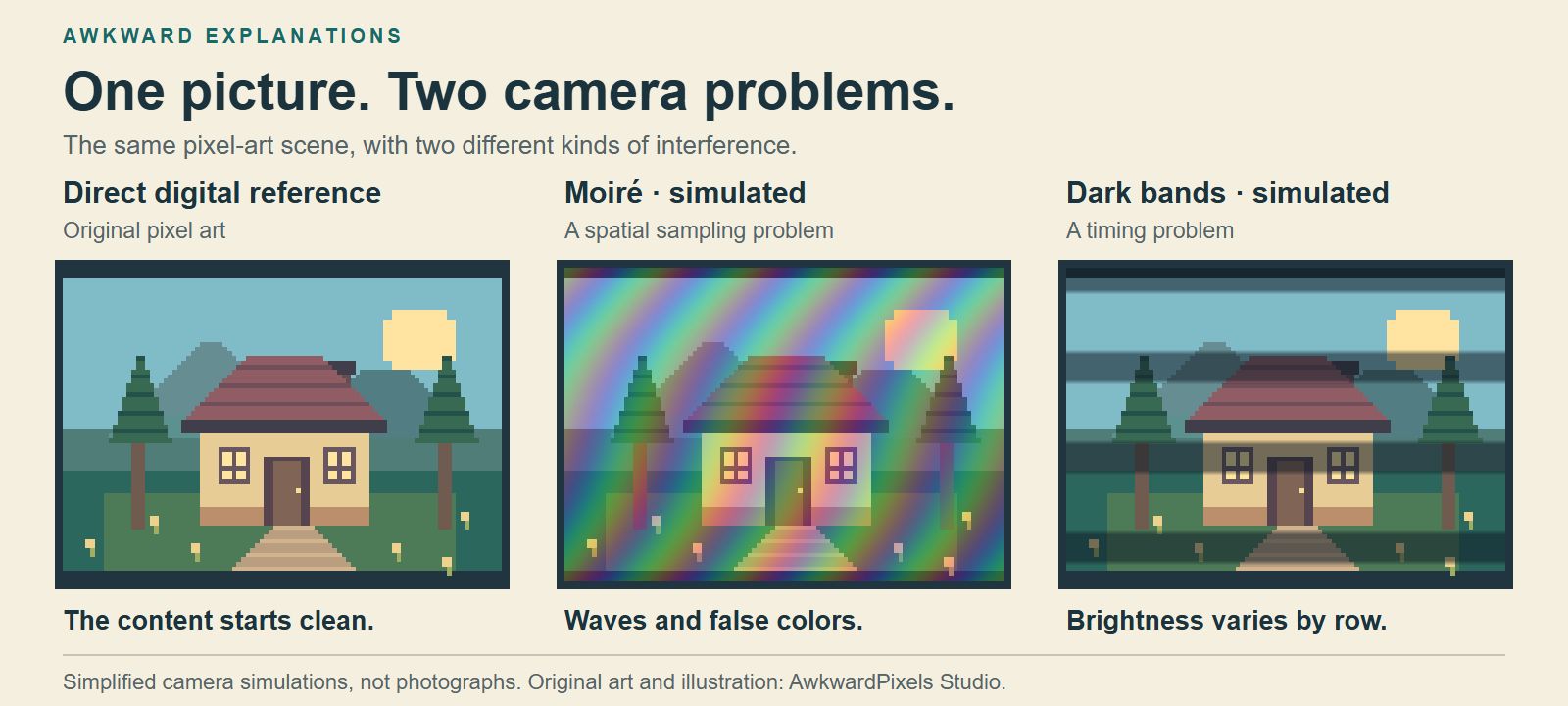
Rainbow ripples often appear when a camera tries to resolve the tiny pixel grid of a screen. That pattern is called moiré. Dark bands can appear when different rows of the camera sensor catch the screen at different points in its brightness cycle. Try moving the camera for ripples or adjusting shutter speed for bands.1235
Are you seeing wavy patterns or dark bands?
Follow the sky across the three views of the same cottage. The first shows the original art. In the middle view, waves of color cross the sky. In the last one, dark stripes cut across the whole scene, roof and all. We added those effects to show what each can look like.
Here’s a way to tell them apart on your own screen. Move your camera a little. If the ripples change size or direction, suspect moiré. Now hold still and take a short video. If a shadow slides down the screen on its own, timing is a good place to start. Both effects can show up in one shot.123
Why do pixel grids make waves and rainbows?
Look through two layers of fine mesh and turn one slightly. Broad stripes appear even though each layer has only tiny holes. Something similar happens when you point a camera at a screen.13
The screen arranges its pixels in a regular grid. The camera measures light on a grid of its own. If the screen detail lands too close together for the camera to distinguish, those measurements can form a much coarser pattern. As the camera reconstructs color from its samples, even a patch of plain blue sky can pick up other colors.13
Why do dark bands move across the screen?
Picture a camera taking a photo one row at a time. That’s how a rolling shutter works. If the screen pulses brighter and dimmer, rows exposed during a bright pulse collect more light. Other rows come out darker. On the next video frame, a different row may catch the bright pulse. That’s how a stripe can travel across a perfectly still desktop.2
The monitor’s refresh rate tells you how often it updates the picture. Its brightness control can have a rhythm of its own. Some monitors dim their backlight by shortening the time it stays on during each pulse. That’s called pulse-width modulation. Matching the camera’s frame rate to the monitor’s refresh rate can still leave that pulsing light in the shot.24
How can you get a cleaner photo or video?
For ripples, take two photos from slightly different distances. Look at the saved pictures at full size. Moving changes how large the screen pixels appear to the camera. A small tilt can help, too. If you soften the focus, check that any text you need is still readable.13
For dark bands, keep the camera still and try a slower shutter speed. A longer exposure lets each row collect light over more of the brightness cycle. Compare short clips of the same screen. If your camera has a variable shutter setting, you can fine-tune the exposure time. You can also try a different screen brightness, since some displays change how they dim the backlight.245
Why does a screenshot look clean?
A screenshot saves the picture from the computer before light from the panel ever reaches a camera. There’s no second grid sampling the cottage and no shutter catching the backlight mid-pulse. That’s why the original sky stays blue.12
If you’re sending someone an error message, a screenshot also keeps the small print legible at its original size. If the point is to show the monitor sitting on your desk, take the photo. Now you know which adjustment to try first.